
Windows Telemetry: Microsoft’s Insight into Developer Activity
Recent analysis of a Windows 11 build has uncovered concerning details regarding the operating system’s data collection practices.
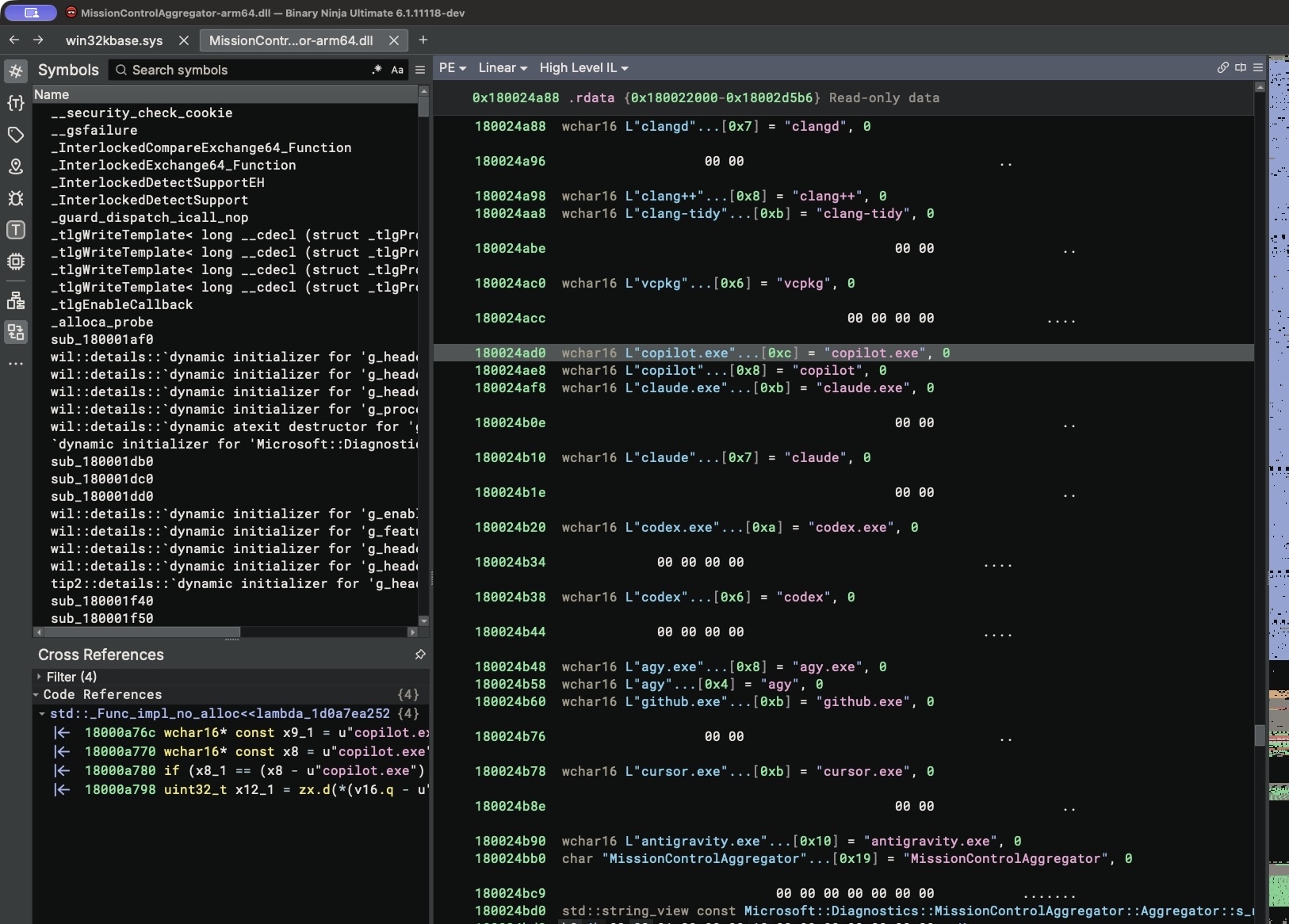
A library identified as MissionControlAggregator.dll appears to be actively scanning for and reporting on the presence of specific AI agents and developer tools.
This discovery raises significant questions about user privacy and the extent of Microsoft’s monitoring of developer activities on its platform.
Table of Contents
The implications of this finding are substantial for developers and users alike. Understanding what data is being collected and how it is used is crucial for maintaining trust and security in the digital workspace.
The potential for Microsoft to gain insight into a user’s coding environment, including specific AI agents and development software, warrants a closer examination of Windows telemetry settings.
MissionControlAggregator.dll: Unpacking the Data Collection Mechanism
At the heart of this discovery lies the MissionControlAggregator.dll library. This component contains a curated list of executable files, ranging from AI agents like `codex.exe` to common development tools such as `python.exe` and `gcc.exe`.
While such monitoring could theoretically be used for local system optimization or security, evidence suggests that this data is being transmitted externally.
Further investigation by security researcher Xusheng Li traced the diagnostic triggers associated with launching these monitored applications.
The findings indicate that, on a default Windows 11 installation, the system actively reports these activities.
Worryingly, this telemetry appears to extend even to Linux environments running within the Windows Subsystem for Linux (WSL), suggesting a pervasive data collection strategy.
Optional Diagnostics: The Consent Conundrum
Microsoft’s default Windows 11 installation includes “optional diagnostics” that are enabled out-of-the-box. While this could be interpreted as a form of user consent, the lack of explicit notification about the specific nature of the data collected, particularly concerning developer tools, presents a significant transparency issue.
Many users, including system administrators, may not be aware that their development environment activities are part of these diagnostics.
This situation highlights a broader challenge in managing operating system privacy settings. The default configurations may not align with user expectations, especially for professionals who handle sensitive code and intellectual property.
It underscores the importance of thoroughly reviewing and customizing privacy options to ensure that personal and professional data remains protected.
Navigating Windows Privacy Settings for Developers
For users concerned about this level of data collection, a thorough review of Windows 11’s privacy settings is highly recommended.
Options related to diagnostic data collection and optional experiences can be adjusted to limit the information shared with Microsoft. This proactive approach is essential for safeguarding sensitive information, particularly in professional development contexts.
The findings echo sentiments from previous reviews of Windows 11, which have often pointed to areas where user privacy could be enhanced.
As the operating system continues to evolve, particularly with the integration of AI-driven features, maintaining robust privacy controls becomes increasingly critical.

Developers may also want to consider alternatives or additional security measures, especially if their work involves highly confidential projects.
Field Readiness and Verdict on Windows Telemetry
The discovery of MissionControlAggregator.dll’s capabilities raises concerns about the default privacy posture of Windows 11 for developers.
While Microsoft may argue that this falls under broad diagnostic data collection, the specific targeting of coding tools and AI agents suggests a more granular level of monitoring than many users anticipate.
This could have implications for intellectual property and competitive development.
The effectiveness of such telemetry for Microsoft’s internal purposes remains to be seen, but the potential for misuse or unintended data exposure is a significant risk.
Users are strongly advised to scrutinize their Windows telemetry settings and consider the implications for their development workflow.
For those prioritizing data privacy, exploring alternative operating systems or implementing stricter security protocols may be necessary.
The ongoing evolution of AI and its integration into operating systems necessitates a vigilant approach to digital privacy, as seen in recent cybersecurity alerts like the Malicious Claude Code Extension breach, which exposed thousands of developers.
Source: Hackaday Engineering